avatar   Ardon Toonstra  

You now decide who can see that you work on a project. This release adds private user profiles and private team members, and brings Mermaid diagrams and a round of security improvements.

Choose who sees your team

Every Simplifier project has a team tab that lists its members, and until now anyone could read it, even on a public project. For a national program or a vendor, the people behind a specification can be sensitive, and the only way to hide them was to make the whole project private. That also hid the specification others have to implement.

Now you can keep the project public and the people private:

  • Private team members. Teams now have a Team settings page, where the member list can be made private. Outside the team, nobody sees who is in it: not on the team tab, in the feed, on project pages, in the journal, in file history, or on user profiles. Existing teams stay public until a team manager changes this. Read more in the documentation.
  • Private user profiles. Under your account settings, you can now close your profile page to everyone but you. Your name still appears next to your work, as plain text, but it no longer links to a page that lists your projects and activity.

Team owners now also see roughly when each member last logged in, to spot accounts that can be removed. And the project log, import log, journal and organization news show a member's display name instead of their username. You can change your display name yourself under Account > Personal, and the logs follow.

Mermaid diagrams, wherever you write

A sequence or flow diagram often explains an exchange better than a page of text, but until now that meant PlantUML or an image kept up to date by hand. Simplifier now renders Mermaid diagrams:

  • in guides, inline with the <mermaid> tag, or from a .mmd or .mermaid file in your project with {{render:}}, just like a PlantUML file;
  • in project readmes, issues and comments, and in embeds.

The guide editor offers Mermaid snippets under Insert snippet to get you started, and the new Mermaid playground lets you try a diagram and share a link to it before it goes into your guide.
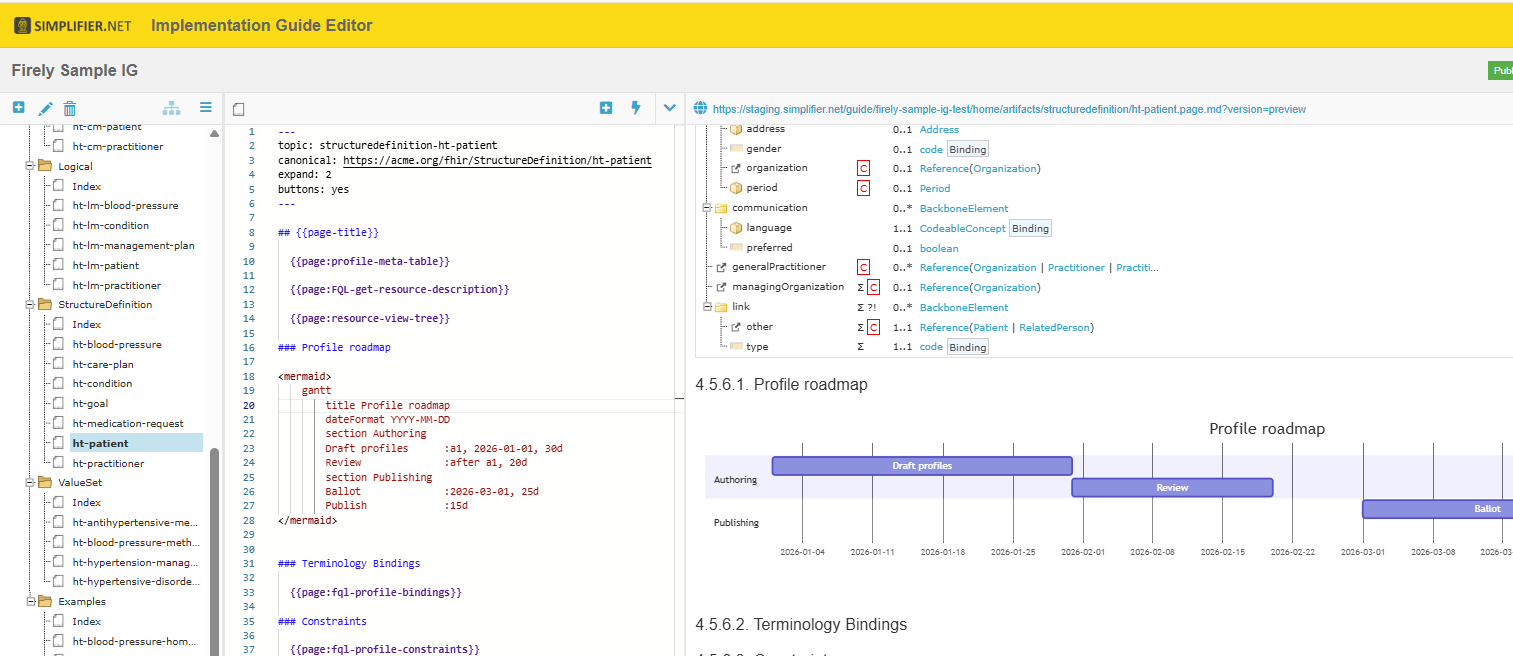
The Implementation Guide Editor with an inline Mermaid Gantt chart, drawn in the preview.

▲ Write the diagram in the page, and the preview draws it.

Please note: if your guide uses a custom style copied before this release, its master template needs one extra script line to show Mermaid diagrams. Here is the line and where it goes.

Other news from Firely
Ardon Toonstra
You now decide who can see that you work on a project. This release adds private user profiles and private team members, and brings Mermaid diagrams.
Ardon Toonstra
Firely Terminal `4.0.0` validates and runs Quality Control the way Simplifier does, and gives your pipelines better control over when a build fails. It is a major release: it runs on .NET 10 and the Firely .NET SDK 6, and a few things you may script against have changed.
Ardon Toonstra
The Forge 2026.3.0 release brings the two package changes Simplifier introduced this year to Forge: canonical pinning, and more than one version of a package in your project.
Ardon Toonstra
Simplifier now keeps every version of a package that your dependencies bring in and resolves your references predictably across them. This release also redesigns the guides overview and starts retiring DSTU2.
Ardon Toonstra
Earlier this year, we asked the Simplifier community how they use Simplifier, Forge, and Firely Terminal in their day-to-day FHIR work. First of all, thank you to everyone who took the time to participate.
Ardon Toonstra
Simplifier now runs entirely on Firely .NET SDK 6. This release brings a list of rendering improvements for your conformance resources, and consolidates our documentation in one place.
Ardon Toonstra
Forge 2026.2.0 upgrades the profiling engine to .NET 10 and Firely .NET SDK 6.2.1, adds support for the suppression extension, and speeds up loading of complex profiles. Quality Control now runs solely on the current Firely validator, and the Project view's Structure Type filter has been streamlined. Note that .NET 10 may need to be installed by your IT department on managed machines.
Ardon Toonstra
Simplifier.net now hosts country-specific results from the 2026 State of FHIR Survey, letting you explore how HL7 FHIR is being adopted in each participating jurisdiction.
Ardon Toonstra
This release lets you pin canonical references when creating a package, locking each one to the exact version it resolved to so your packages stay reproducible. Simplifier honours the version in a reference when resolving, with two new quality-control rules to help you pin safely. On top of that, the platform has moved to .NET 10, alongside a set of UI improvements and bug fixes.
Ardon Toonstra
The 2026 Simplifier User Survey is now open, and we need your input. Tell us which tools and features drive real value in your FHIR workflow, and where the platform can do better. It only takes a few minutes, and your response shapes what we build next.