Patient LIB list
Introduction
The sfm-lib-List resource in SFM is used to represent the patients current medication list (LIB=Legemidler I Bruk or medication in use), a snapshot for a given time or aggregated list for a periode in time.
The resource is avaialble to make it possible for EPJ systems to retreive current, previous or future list of prescriptions from SFM.
Only the commands GET is made available for practitioners. The resource can be requested with different purposes and different input parameters is specified.
The LIB list could be requested based on different puposes:
- Using it in correspondance
- Presenting it in patient overview
- Using it for medication administration
- Input to a curve system
Each purpose requires differnt type of data as input and feedback.
Patient overview
The returned List contains a text property with a preformatted HTML "div" for easy presentation.
Correspondance
An XML representation suitable for correspondance (PLO melding, Henvisning, Epikrise) is presented as a base64 encoded extension (correpondancedata) The scema used for this strucure may be found under "Pleie- og omsorgsmeldinger 1.6" at sarepta.ehelse.no https://sarepta.ehelse.no/standard/Pleie%20og%20omsorgsmeldinger/1.6 (Felleskomponenter)
Administration (_query=administration and time period)
LIB for administration requires period that the data should be returned for and a patient ticket. SFM will then return detailed information about any medication that should be administrated within current period.
First instance of dosage is returned with textual details (textual dosage, shortdose, typeofuse, applicationarea and aditional instructions), the rest of dosage identifies a single dose. In other words, one structured dosage element per dosage event within a medicationstatement is returned for the period spesified in the request. If SFM is not able to calculate a structured dosage, then only textual dosage is returned for that particular medication statement.
Curve system (_query=curve)
LIB for curve system requires parameter "curve" and a patient ticket. SFM will then return advanced dosage for medications where it is included.
FHIR
sfm-lib-List is a profile on List. To retrieve the lib-list for a patient, a patientTicket must be presented: (for info about patientTicket see general documentation for SFM) Example: https://datashare.test2.forskrivning.no/List/?patientTicket=d4f7e6f2-aad9-4f87-8e28-203cc1835f65
The API will return a search-bundle containing one List resource. The "normal" reponse will return a list and contained resources for MedicationStatement and other info. The resouce is extended with a base64encoded XML structure suitable for correspondance data.
The API supports special variants as described above by using the _query parameter:
Read prescription list
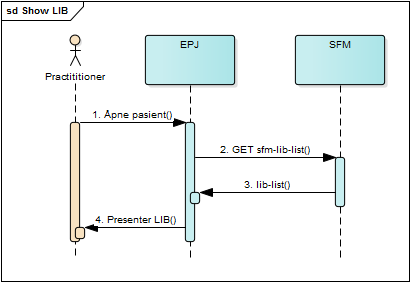
- User open patient in EPJ.
- EPJ request about updated prescription information
- SFM creates the list with meta data and returns it to EPJ.
- EPJ presents the list to the user.
MedicationStatement dosing information
When extracting list including medicationstatements with dosing based on measurements(Observation), a reference to the Observation will be included in derivedFrom.
Observation may then be retrieved from datashare with READ operation.
Medication resources
Optional: medication details in the same response (includeMedication)
As of SFM-25416, you can ask for sfm-Medication resources in the same LibList response so you do not need one Medication read per line for codes, ATC, pharmaceutical form, and related details.
Design notes and examples were shared with vendors on that Jira issue (see comments for the original wording). This section matches that thread.
| What we add | Behaviour |
|---|---|
| New query parameter | With includeMedication=true, Medication is in List.contained and MedicationStatement.medicationReference uses a contained reference (e.g. #id) instead of an external URL. |
| Without the parameter | Same as before: absolute Medication URLs; no breaking change. |
What to implement in the client
| Area | Preparation |
|---|---|
| Request | Send includeMedication=true when you want drug details in the LibList response. |
| Response | Resolve #... references against List.contained; still handle absolute medicationReference where inlined medication is not returned. |
| Existing flows | Unchanged if you do not use the new parameter. |
Parameter: includeMedication=true on the same List search as today (in addition to patientTicket and any _query, from / to, summary, etc.).
Default: If you omit the parameter or set includeMedication=false, behaviour matches earlier integrations: each MedicationStatement points to Medication with an absolute URL; you may still batch-fetch with Medication?_id=id1,id2,... as below.
When includeMedication is true:
Medicationinstances are added toList.contained(profilesfm-Medication). Implementations typically place them before the containedMedicationStatementresources in the array.MedicationStatement.medicationReferencenormally becomes a local reference, e.g.#MERKE-001, pointing to the matchingMedication.idin the samecontainedarray. FEST identifiers may use underscores in coding;Medication.iduses hyphens so the id is valid FHIR.List.entry[].itemstill references theMedicationStatement(notMedicationdirectly).
Exceptions: Some rows (e.g. certain preparation types or missing FEST data) may still use an absolute medicationReference URL; clients should support both #... and http(s)://.../Medication/... as today.
Query examples
https://datashare.test2.forskrivning.no/List/?patientTicket={uuid}&includeMedication=true
https://datashare.test2.forskrivning.no/List/?patientTicket={uuid}&_query=administration&from=2022-11-20T00:00:00&to=2022-11-24T23:59:59&includeMedication=true
Reference examples (illustrative only; ids and URLs differ per environment).
When includeMedication is off, entry.item still points at the contained statement, and the statement points at the server Medication URL:
{
  "resourceType": "List",
  "entry": [{ "item": { "reference": "#987654", "display": "Paracetamol 500 mg tabletter" } }],
  "contained": [
    {
      "resourceType": "MedicationStatement",
      "id": "987654",
      "medicationReference": {
        "reference": "https://api.example/fhir/Medication/a1b2c3d4-e5f6-7890-abcd-ef1234567890",
        "type": "Medication",
        "display": "Paracetamol 500 mg tabletter"
      }
    }
  ]
}
When includeMedication is on, a contained Medication is present and medicationReference targets it with # plus Medication.id:
{
  "resourceType": "List",
  "entry": [{ "item": { "reference": "#987654", "display": "Paracetamol 500 mg tabletter" } }],
  "contained": [
    {
      "resourceType": "Medication",
      "id": "MERKE-001",
      "meta": { "profile": [ "http://ehelse.no/fhir/StructureDefinition/sfm-Medication" ] }
    },
    {
      "resourceType": "MedicationStatement",
      "id": "987654",
      "medicationReference": {
        "reference": "#MERKE-001",
        "type": "Medication",
        "display": "Paracetamol 500 mg tabletter"
      }
    }
  ]
}
To resolve: strip the # prefix and find another resource in List.contained with that id.
Shape of a real contained Medication (abridged)
Internal verification on a dev environment (see SFM-25416 comments) showed a contained medication similar to:
{
  "resourceType": "Medication",
  "id": "ID-775DCB7F-C120-42D5-AC96-3D93E48C85C1",
  "meta": { "profile": [ "http://ehelse.no/fhir/StructureDefinition/sfm-Medication" ] },
  "identifier": [{ "use": "official", "type": { "text": "identifier" }, "value": "ID_775DCB7F-C120-42D5-AC96-3D93E48C85C1" }],
  "code": {
    "coding": [
      { "system": "http://ehelse.no/fhir/CodeSystem/FEST", "code": "ID_775DCB7F-C120-42D5-AC96-3D93E48C85C1", "display": "Metoprolol depottab 200 mg" },
      { "system": "http://www.whocc.no/atc", "code": "C07AB02", "display": "Metoprolol" }
    ]
  },
  "form": { "coding": [{ "system": "urn:oid:2.16.578.1.12.4.1.1.7448", "code": "25", "display": "Depottablett" }] }
}
(Extensions such as prescription group may also be present; see live responses.)
Batch lookup when medications are not inlined
When an EPJ does not use includeMedication=true, it can follow up sfm-lib-List with Medication reads. The standard FHIR mechanism for multiple values separated with comma in a search can be used:
example: http://datashare.forskrivning.no/Medication?_id=ID_123,ID_234